 Gamer · November 9, 2026 · ~6 min read
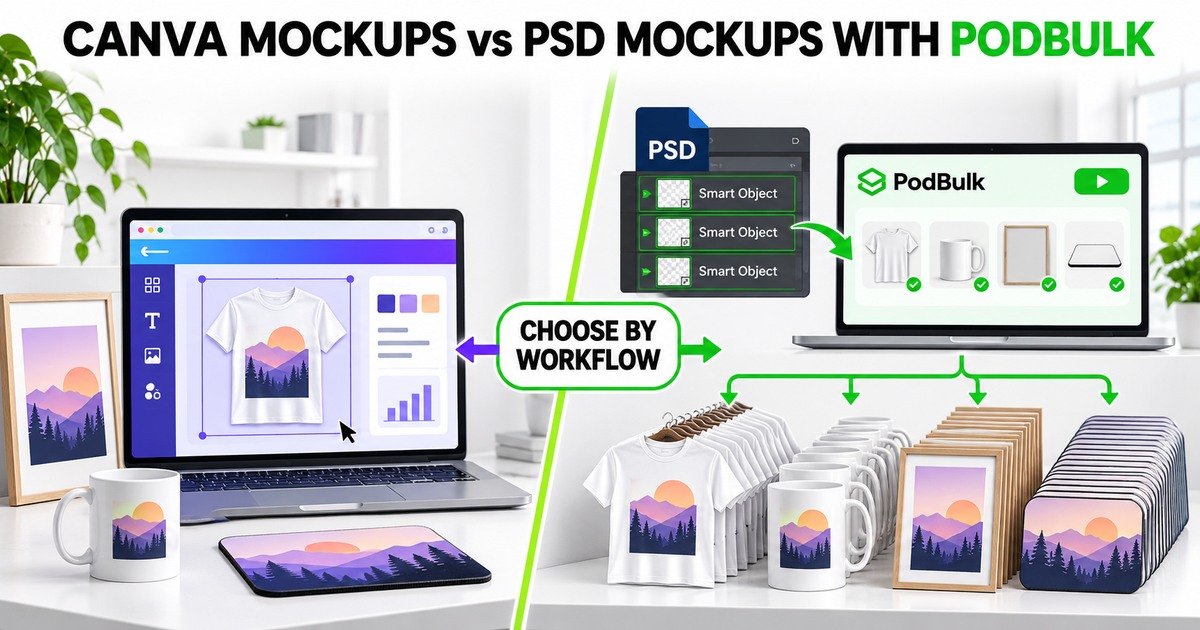
Canva and PSD Smart Object mockups can both place artwork on products, but they are not the same production system. Canva is a broad visual-design workspace with mockup features and paid Bulk Create options. A PSD mockup is a layered scene whose Smart Objects can preserve perspective, masks and transformations. PodBulk is built to replace those targets across compatible PSD files without opening each one in Photoshop.
The useful question is not “Which tool wins?” It is “Which workflow produces the required image set with the least repetitive work and the fewest avoidable errors?”
Quick comparison
- Choose Canva for flexible one-off graphics, quick compositions and designs assembled directly in a browser canvas.
- Choose PSD + PodBulk when you own reusable PSD scenes and need to place many finished designs into tested Smart Object targets.
- Use both when Canva creates source graphics or marketing layouts and PodBulk handles the repeatable PSD mockup matrix.
What Canva mockups are good at
Canva offers a familiar drag-and-drop environment for composing graphics and applying a design to available mockup formats. It is convenient when a seller wants to create or adjust one visual while adding text, background elements or social-media formatting in the same workspace.
Canva also documents Bulk Create for eligible paid and organizational plans. That feature can generate design variants from spreadsheet-style data. It is useful for changing names, prices, text or images connected to a Canva template.
Where Canva can become repetitive for POD scenes
A data-driven Canva template is not automatically the same as a layered commercial PSD mockup. If your preferred scene exists as a PSD with Smart Objects, rebuilding it in another system may discard masks, linked layers, displacement, realistic folds or established colour controls.
For one design, the difference may not matter. For 100 designs across ten PSD scenes, manually opening and exporting each composition creates 1,000 design-template combinations.
What a PSD Smart Object mockup does
Adobe documents that replacing Smart Object contents retains existing transformations. A compatible product scene can keep its perspective and placement while the source artwork changes. The surrounding PSD may contain shadows, highlights, textures and masks that make the result look integrated.
This power depends on the template. A confusing PSD can contain multiple Smart Objects for labels, texture or decoration. The artwork target must be identified correctly before any batch is trusted.
Where PodBulk fits
PodBulk takes finished designs and compatible PSD templates, finds or targets the intended Smart Objects and produces organized mockup output in a browser workflow. It is not a full general-purpose design canvas. Its strength is the repeated replacement and export job.
- Auto detect: use one unambiguous Smart Object, preferring a target named
podmock. - Focus: use one exact, case-sensitive Smart Object name.
- multiFocus: place the same design into every intended Smart Object sharing a prefix such as
mock_.
Hidden Smart Objects and targets inside layer groups can be found. Test the PSD before scaling because a successful file open does not prove every visual result is correct.
Canva Bulk Create and PodBulk are not duplicates
Canva Bulk Create connects variable data to elements inside Canva templates. PodBulk connects design files to Smart Object targets inside PSD mockup templates. One is useful for data-driven graphic variations; the other is useful for a design × PSD scene matrix.
If you sell personalized wall art, Canva may help assemble names and dates into final design files. PodBulk can then place those approved files into owned PSD room scenes. The handoff should use stable dimensions, filenames and colour settings.
Example: 100 designs across product scenes
Imagine 100 finished artworks and eight approved PSD scenes: two shirt angles, two mug views, two posters and two mouse pads. That is 800 potential outputs. Manually replacing every Smart Object makes file selection, naming and export consistency as important as the visual edit.
With PodBulk, test the eight PSDs, document their target mode and run the finished design folder through the approved templates. Organize output by product, scene and design ID. The time saved depends on file complexity and the device; do not promise a universal number.
Choose by task, not brand loyalty
Use Canva when:
- You need one fast visual or social graphic.
- The template already lives in Canva.
- You want to combine text, icons and layout interactively.
- Your variants are driven mainly by spreadsheet data.
- You do not require a particular layered PSD scene.
Use PSD mockups with PodBulk when:
- You own licensed PSD templates you want to keep using.
- Smart Object placement, masks and lighting matter.
- You need the same designs across many scenes.
- Exact Focus or multiFocus targeting avoids the wrong layer.
- You want organized local batch downloads without opening Photoshop for every file.
When a hybrid workflow is best
Create source graphics wherever your design system works best. Export finished artwork at the dimensions and format expected by the PSD. Use PodBulk for the repeatable mockup step, then use Canva or another editor for platform-specific marketing graphics that combine several assets.
Preserve clean masters. Do not resize or watermark the only copy. Keep source designs, PSD masters, approved mockups and marketplace derivatives in separate folders.
The proof batch that prevents 800 mistakes
- Choose a light, dark and high-contrast design with obvious orientation.
- Run them through every PSD scene.
- Inspect perspective, masks, shadows, edges and crop.
- Verify target names and output filenames.
- Compare the mockup with the real fulfilment product.
- Approve the template profile before the full batch.
Automation repeats both good structure and bad structure. A proof batch is part of production, not an optional extra.
Quality and licensing still belong to the seller
Neither Canva nor PodBulk grants permission to use every template found online. Record the commercial licence and follow marketplace image rules. Do not publish a mockup that changes product scale, colour, material or included items in a misleading way.
PodBulk automates production; it does not guarantee Etsy visibility or sales. Canva accelerates composition; it does not automatically make every listing image accurate.
Final verdict
Canva is excellent for flexible design work and quick compositions. PSD Smart Object mockups remain valuable when sellers have realistic layered scenes they trust. For large repeated PSD replacement, PodBulk is the more specialized workflow because it targets the structure already inside the PSD.
The strongest system may combine them: design or personalize where convenient, approve the artwork, batch the PSD mockups with PodBulk, then create final channel-specific graphics from clean exports.
Start a controlled PodBulk test
Open the PodBulk mockup app with one licensed PSD and three contrasting designs. Confirm Auto detect, Focus or multiFocus, approve the visual result and only then expand to the full batch.
Continue with the Smart Object naming guide and the 1,000-mockup planning guide.
Official sources
Frequently asked questions
Is Canva good for product mockups?
Yes for quick composition, individual visuals and sellers who prefer a browser design canvas. Its mockup and paid Bulk Create features solve different parts of the workflow.
Why use PSD Smart Object mockups?
A well-built PSD can preserve perspective, masks, lighting and other transformations when the Smart Object content is replaced. That makes tested scenes reusable.
Can Canva Bulk Create replace PodBulk?
Not exactly. Canva Bulk Create creates design variants from data, while PodBulk specializes in replacing artwork inside compatible PSD Smart Object templates and exporting mockup batches.
Do I need Photoshop to use PodBulk?
No. PodBulk processes compatible PSD mockups in the browser. Photoshop or another PSD editor can still be useful for building or repairing templates.
Which workflow is better for 100 designs?
Use the workflow that matches the source templates and outputs. For repeated placement into owned PSD mockup scenes, PodBulk is purpose-built; for flexible one-off layouts, Canva may be more direct.
Stop making mockups one by one
Every design on every PSD template, in one run, right in your browser. 200 free mockups a month.