 Gamer · November 7, 2026 · ~7 min read
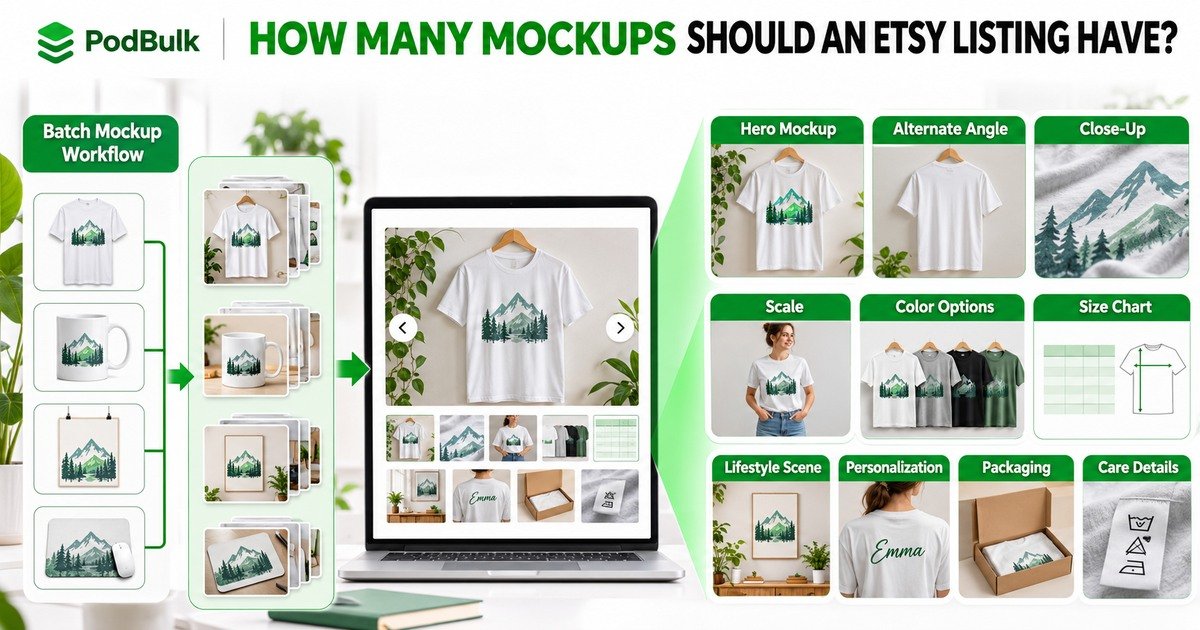
Etsy currently gives a listing room for up to 20 photos, but that does not mean every seller should upload 20 nearly identical mockups. The right number is the smallest set that answers the buyer’s important questions: what the product looks like, how large it is, what changes between variations and what arrives after purchase.
For print-on-demand sellers, the challenge is producing that useful image set across many designs without turning every listing into an hour of manual PSD replacement. This guide separates image strategy from production and shows where PodBulk fits.
The short answer
Use enough images to explain the product completely, not enough to fill a quota. Start with a strong hero image, then add only views that answer a different question. Etsy currently allows up to 20 photos and two short videos, but the best count depends on the product, variations, personalization and available real photography.
A practical 10-part POD image plan
- Hero mockup: one clear finished product at thumbnail size.
- Alternate angle: back, side or second meaningful view.
- Design close-up: print texture, embroidery or artwork detail.
- Scale: product on a person or beside a familiar object.
- Colour options: only the colours actually available.
- Size information: measurements or a readable chart.
- Lifestyle context: the product used naturally.
- Personalization: accurate examples and input instructions.
- What arrives: packaging, included pieces or digital files.
- Care or process: the most important after-purchase detail.
This is a menu, not a rule. A mug may not need a separate size chart. A personalized family shirt may need multiple size, name and colour examples. Remove any image that repeats another image without adding information.
1. Make the first image singular and clear
The primary image must work when small. Show one finished-product composition with an obvious design and realistic proportions. Avoid a collage of six scenes, tiny text, decorative arrows or several products competing for attention.
Etsy’s current guidance warns that a primary image that is too dark, blurry or part of a collage may affect search visibility. That is not a guarantee that a certain mockup ranks higher. It is a reason to prioritize clarity.
2. Use the second image to remove the largest doubt
Ask what the hero does not explain. For a shirt, the next image may show the back or fit. For a mug, it may show the opposite side of a wrap design. For a poster, it may show the print without a frame. For a mouse pad, it may show thickness and edge stitching.
Do not choose a second image merely because it is attractive. Choose it because it answers the next likely question.
3. Show detail without exaggerating quality
A close-up can show ink texture, fabric, stitching or surface finish. Match the real fulfilment product. Do not invent texture, sharpness or colour intensity the production method cannot deliver.
Order samples for important products and compare the mockup with the delivered item. Update templates when the supplier, garment blank or print area changes.
4. Explain scale and placement
Buyers can misread a design shown against an empty background. Show scale on a person, in a room or beside a familiar object. Keep the artwork placement consistent with the provider’s print area and the selected product size.
If a single PSD stretches the same art identically across all sizes, it may create a false impression. Use separate templates or explanatory images when scale changes materially.
5. Treat variations as product information
Show only colours and styles the listing offers. Keep the design placement believable on light and dark products. If a variation changes the print method, material or design colour, make that difference visible.
A wall of twenty colour swatches is not always useful. Group compatible options cleanly and reserve individual slots for variations that genuinely need a separate view.
6. Make size information readable
A size chart should use the supplier’s current measurements and identify the unit. Do not make it so small that buyers must zoom through a dense spreadsheet. Pair the chart with fit guidance only when that guidance is supported.
For posters, mugs and desk products, show the physical dimensions in context. A measurement graphic should supplement an accurate product view, not replace it.
7. Use lifestyle images as context, not fantasy
Lifestyle scenes help buyers imagine the product, but the scene must not change what is sold. Do not include props in a way that suggests they are included. Avoid impossible lighting, floating products or art that bends incorrectly around a surface.
Record the licence for every PSD and scene. A template found online is not automatically approved for commercial use.
8. Explain personalization visually
Show a realistic finished example, the available fields and where the information appears. Etsy’s guidance for personalized listings allows additional mockups or digital images to show options, but placeholder text should not substitute for a finished representation.
Use a proofing process when spelling, dates or layout can create an expensive remake. The listing should explain whether the customer approves a proof and how long they have to respond.
9. Include what the customer receives
If packaging, inserts, frames or accessories are important, show what is and is not included. Digital products should clearly identify file types and delivery rather than presenting a physical package that does not arrive.
For POD items, distinguish the design from the fulfilment product. The image should not imply handmade production steps the seller does not perform.
10. Use the last image to prevent a common problem
Finish with the information that prevents returns or messages: care instructions, colour caveat, frame exclusion, shipping format, personalization deadline or a concise ordering sequence.
Keep essential conditions in the written description too. Buyers should not need to extract every policy from text embedded inside an image.
How PodBulk produces the image set faster
Once the image plan is decided, use compatible PSD templates for each required view. PodBulk can batch-replace the Smart Object with many designs instead of opening each PSD manually.
- Auto detect works when the PSD has one unambiguous Smart Object target.
- Focus targets one exact, case-sensitive Smart Object name.
- multiFocus places the same design into every intended Smart Object sharing a prefix such as
mock_.
That makes it practical to create the hero, angle, detail and lifestyle sets consistently. PodBulk does not decide which images are truthful or which Etsy rule applies. The seller still approves templates, licences, placement and output.
Build a design × template matrix
Suppose a shirt listing needs six mockup scenes and you have fifty designs. Manual replacement creates 300 design-scene combinations. With PodBulk, test the six PSDs first, document their Smart Object targets, then run the design set through the approved templates.
Use stable filenames such as design-014__shirt-white-hero.jpg and design-014__shirt-detail.jpg. Keep clean master exports separate from marketplace-sized derivatives.
The three-design proof before a full batch
- Choose one light design, one dark design and one high-contrast design with obvious orientation.
- Run them through every proposed template.
- Inspect perspective, masks, edges, shadows, colour and crop.
- Compare the scene with the real fulfilment product.
- Approve or repair the PSD before producing the full matrix.
A batch tool repeats whatever it is given. Testing prevents one wrong crop from becoming hundreds of wrong files.
Current Etsy image rules to verify
Etsy currently allows up to 20 photos and two videos of 5–15 seconds on a listing. Its image guidance recommends large images and says listing images must accurately represent the item. For most physical items, Etsy describes an unedited-photo requirement with exceptions and specific treatment for certain product types, including qualifying print-on-demand items.
Rules can change. Read Etsy’s current documentation for the exact product before publishing. Do not rely on an old checklist or assume that a realistic mockup automatically satisfies every requirement.
A simple decision rule
For each image, complete this sentence: “This image helps the buyer understand ___.” If the blank is the same as the previous image, remove or replace it. If an important question remains unanswered, add the view that answers it.
The goal is not twenty images. The goal is a complete, accurate product explanation produced without unnecessary manual work.
Start your Etsy mockup workflow
Open the PodBulk mockup app, select one tested PSD and run three contrasting designs. Once the proof passes, expand the design × template matrix and keep every output organized.
Continue with the Etsy listing-image workflow and the guide to creating 1,000 mockups from PSD templates.
Official sources
Frequently asked questions
How many photos can an Etsy listing have?
Etsy currently allows up to 20 photos and two short videos per listing. That is capacity, not a requirement to fill every slot.
How many mockups should a POD seller actually use?
Use enough images to answer the important product questions without repetition. A simple item may need fewer images than a personalized product with many sizes or variations.
Can every Etsy listing image be a mockup?
Current Etsy rules vary by product type and generally require accurate representation, with at least one unedited photo for most physical items and stated exceptions. Review the current rule for your item.
What should the first Etsy listing image show?
Use one clear, realistic finished-product view that reads well at thumbnail size. Avoid making the primary image a dark, blurry or crowded collage.
How does PodBulk help create Etsy listing images?
PodBulk batch-replaces compatible PSD Smart Objects and can organize derivatives. It speeds repeatable production, while the seller still chooses accurate scenes and performs quality control.
Stop making mockups one by one
Every design on every PSD template, in one run, right in your browser. 200 free mockups a month.